
In this post we will learn how to write data into Excel sheet using JExcel API.
Below is Java code for writing the data into excel sheet:
WriteExcel.java
package com.technsolution;
import java.io.File;
import java.io.IOException;
import java.util.Locale;
import jxl.CellView;
import jxl.Workbook;
import jxl.WorkbookSettings;
import jxl.format.UnderlineStyle;
import jxl.write.Label;
import jxl.write.Number;
import jxl.write.WritableCellFormat;
import jxl.write.WritableFont;
import jxl.write.WritableSheet;
import jxl.write.WritableWorkbook;
import jxl.write.WriteException;
import jxl.write.biff.RowsExceededException;
public class WriteExcel {
private WritableCellFormat timesBold;
private WritableCellFormat times;
private String outputFile;
String [] name = {"Rahul","Kiran","Shweta","Raj","Sahil"};
int [] marks = {87,98,89,87,90};
public static void main(String[] args) throws IOException, WriteException {
WriteExcel we = new WriteExcel();
we.setOutputFile("D:/Output.xls");//Location of output file
we.write();
}
public void setOutputFile(String outputFile) {
this.outputFile = outputFile;
}
public void write() throws IOException, WriteException {
File file = new File(outputFile);
WorkbookSettings wbSettings = new WorkbookSettings();
wbSettings.setLocale(new Locale("en", "EN"));
WritableWorkbook workbook = Workbook.createWorkbook(file, wbSettings);//creating workbook
workbook.createSheet("Report", 0);//creating the first sheet of the workbook
WritableSheet excelSheet = workbook.getSheet(0);
createLabel(excelSheet);
createContent(excelSheet,name,marks);
workbook.write();
workbook.close();
}
private void createLabel(WritableSheet sheet) throws WriteException {
// Lets create a times font
WritableFont times10pt = new WritableFont(WritableFont.TIMES, 10);
// Define the cell format
times = new WritableCellFormat(times10pt);
// Create a bold font
WritableFont times10ptBoldUnderline = new WritableFont(WritableFont.TIMES, 10, WritableFont.BOLD, false,
UnderlineStyle.NO_UNDERLINE);
timesBold = new WritableCellFormat(times10ptBoldUnderline);
// Lets automatically wrap the cells
timesBold.setWrap(true);
CellView cv = new CellView();
cv.setFormat(times);
cv.setFormat(timesBold);
// Write a few headers
addCaption(sheet, 0, 0, "Names");
addCaption(sheet, 1, 0, "Marks");
}
//Method for adding data to the columns
private void createContent(WritableSheet sheet, String[] names, int[] marks) throws WriteException,
RowsExceededException {
for (int i = 1; i <= names.length; i++) {
// First column
addLabel(sheet, 0, i, names[i-1]);
// Second column
addNumber(sheet, 1, i, marks[i-1]);
}
}
//Method for adding Headers of the columns
private void addCaption(WritableSheet sheet, int column, int row, String s)
throws RowsExceededException, WriteException {
Label label;
label = new Label(column, row, s, timesBold);
sheet.addCell(label);
}
//Method for adding string values to excel sheet
private void addLabel(WritableSheet sheet, int column, int row, String s)
throws WriteException, RowsExceededException {
Label label;
label = new Label(column, row, s, times);
sheet.addCell(label);
}
//Method for adding numeric values to excel sheet
private void addNumber(WritableSheet sheet, int column, int row, int num)
throws WriteException, RowsExceededException {
Number number;
number = new Number(column, row, num, times);
sheet.addCell(number);
}
}
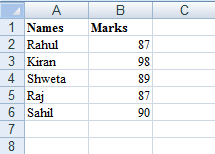
Here is the output file generated by the above java file:
Output.xls
To use the JExcel API we need to add jxl-2.6.jar which contains all the classes required for reading and writing so don't forget to include it in the project build path.
Below is Java code for writing the data into excel sheet:
WriteExcel.java
package com.technsolution;
import java.io.File;
import java.io.IOException;
import java.util.Locale;
import jxl.CellView;
import jxl.Workbook;
import jxl.WorkbookSettings;
import jxl.format.UnderlineStyle;
import jxl.write.Label;
import jxl.write.Number;
import jxl.write.WritableCellFormat;
import jxl.write.WritableFont;
import jxl.write.WritableSheet;
import jxl.write.WritableWorkbook;
import jxl.write.WriteException;
import jxl.write.biff.RowsExceededException;
public class WriteExcel {
private WritableCellFormat timesBold;
private WritableCellFormat times;
private String outputFile;
String [] name = {"Rahul","Kiran","Shweta","Raj","Sahil"};
int [] marks = {87,98,89,87,90};
public static void main(String[] args) throws IOException, WriteException {
WriteExcel we = new WriteExcel();
we.setOutputFile("D:/Output.xls");//Location of output file
we.write();
}
public void setOutputFile(String outputFile) {
this.outputFile = outputFile;
}
public void write() throws IOException, WriteException {
File file = new File(outputFile);
WorkbookSettings wbSettings = new WorkbookSettings();
wbSettings.setLocale(new Locale("en", "EN"));
WritableWorkbook workbook = Workbook.createWorkbook(file, wbSettings);//creating workbook
workbook.createSheet("Report", 0);//creating the first sheet of the workbook
WritableSheet excelSheet = workbook.getSheet(0);
createLabel(excelSheet);
createContent(excelSheet,name,marks);
workbook.write();
workbook.close();
}
private void createLabel(WritableSheet sheet) throws WriteException {
// Lets create a times font
WritableFont times10pt = new WritableFont(WritableFont.TIMES, 10);
// Define the cell format
times = new WritableCellFormat(times10pt);
// Create a bold font
WritableFont times10ptBoldUnderline = new WritableFont(WritableFont.TIMES, 10, WritableFont.BOLD, false,
UnderlineStyle.NO_UNDERLINE);
timesBold = new WritableCellFormat(times10ptBoldUnderline);
// Lets automatically wrap the cells
timesBold.setWrap(true);
CellView cv = new CellView();
cv.setFormat(times);
cv.setFormat(timesBold);
// Write a few headers
addCaption(sheet, 0, 0, "Names");
addCaption(sheet, 1, 0, "Marks");
}
//Method for adding data to the columns
private void createContent(WritableSheet sheet, String[] names, int[] marks) throws WriteException,
RowsExceededException {
for (int i = 1; i <= names.length; i++) {
// First column
addLabel(sheet, 0, i, names[i-1]);
// Second column
addNumber(sheet, 1, i, marks[i-1]);
}
}
//Method for adding Headers of the columns
private void addCaption(WritableSheet sheet, int column, int row, String s)
throws RowsExceededException, WriteException {
Label label;
label = new Label(column, row, s, timesBold);
sheet.addCell(label);
}
//Method for adding string values to excel sheet
private void addLabel(WritableSheet sheet, int column, int row, String s)
throws WriteException, RowsExceededException {
Label label;
label = new Label(column, row, s, times);
sheet.addCell(label);
}
//Method for adding numeric values to excel sheet
private void addNumber(WritableSheet sheet, int column, int row, int num)
throws WriteException, RowsExceededException {
Number number;
number = new Number(column, row, num, times);
sheet.addCell(number);
}
}
Here is the output file generated by the above java file:
Output.xls
To use the JExcel API we need to add jxl-2.6.jar which contains all the classes required for reading and writing so don't forget to include it in the project build path.


